Bug world
Warning
qrobot_simulator is experimental and its interfaces may change between minor releases.
Two RGB eyes and a frontal proximity sensor drive five actions: bite, move forward,
move backward, and rotate in either direction. The world can run a ClassicalBug
or a QuantumBug through the same sensor and action interface.
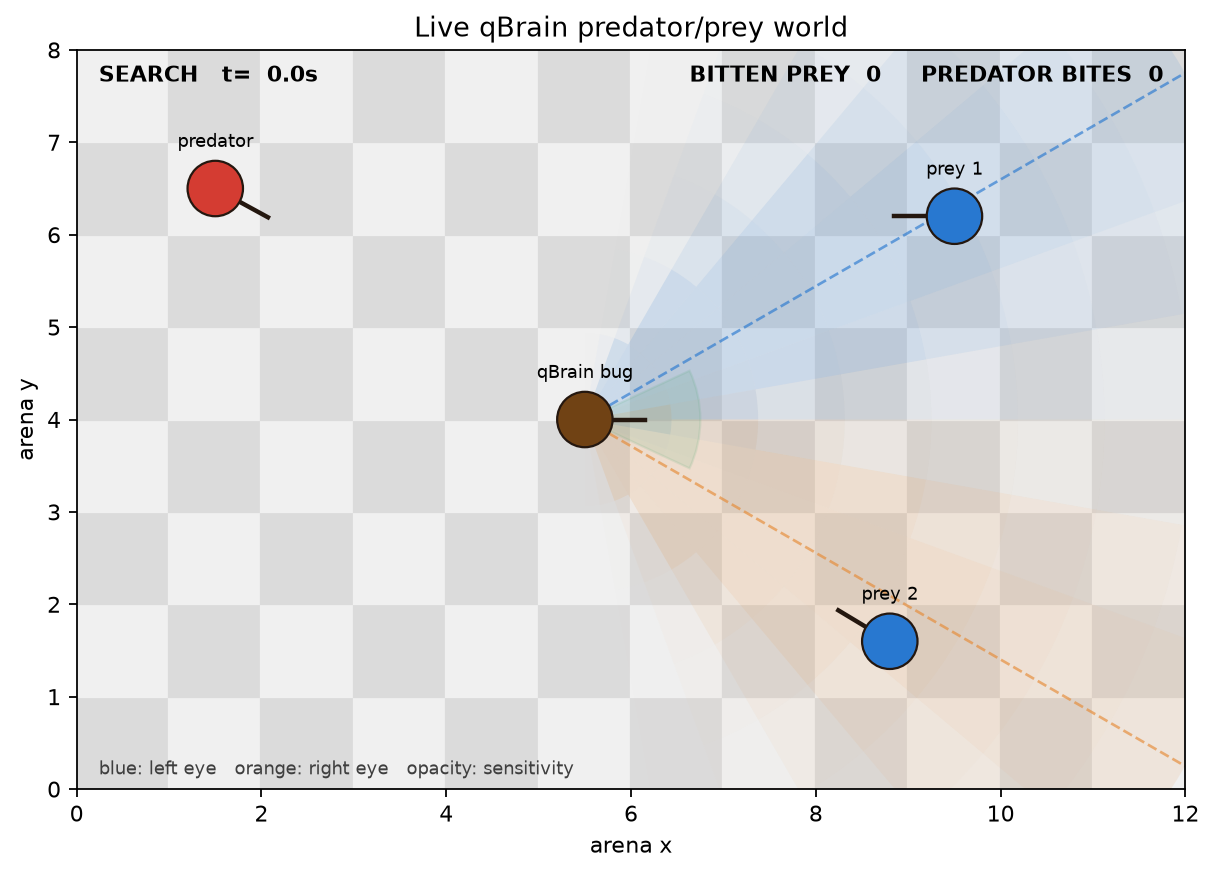
The simulation asks whether the controlled brown bug can pursue blue prey while avoiding a red predator. Blue prey flee when the bug or red predator comes close; the red predator continuously pursues the bug. The bug receives no coordinates. It must infer prey, threat, and contact from its two RGB eyes and frontal proximity sensor, then choose movement and biting actions. Successful bites remove and respawn blue prey, while contacts made by the red predator are counted against the bug.
Setup
The world contains one controlled brown bug, two blue prey, and one red predator on a toroidal board: crossing an edge returns a body through the opposite edge. One prey follows a curved deterministic path and the other wanders randomly; both flee a nearby hunter. The predator reads the bug’s position and pursues it. These independent movements continually change what the bug can sense and act upon.
The arena dimensions below determine the wraparound boundaries. The sensor rows describe what part of that arena the bug can observe. The remaining values control how soon blue prey flee and how quickly the red predator pursues the bug.
import pandas as pd

from qrobot_simulator.bug_world.robots.config import (
    CLASSICAL_BUG_CONFIG,
    PREDATOR_CONFIG,
    PREY_CONFIG,
    QUANTUM_BUG_CONFIG,
)
from qrobot_simulator.bug_world.world.config import WORLD_CONFIG

world_setup = {
    "arena (columns × rows)": f"{WORLD_CONFIG.board_columns} × {WORLD_CONFIG.board_rows}",
    "prey count": len(WORLD_CONFIG.prey_spawns),
    "proximity range": WORLD_CONFIG.proximity_distance,
    "proximity half-angle (degrees)": WORLD_CONFIG.proximity_half_angle_degrees,
    "eye offset (degrees)": round(WORLD_CONFIG.eye_angle * 180 / 3.141592653589793),
    "prey flee distance": PREY_CONFIG.flee_distance,
    "predator speed": PREDATOR_CONFIG.pursuit_speed,
}
display(pd.DataFrame.from_dict(world_setup, orient="index", columns=["value"]))
| value | |
|---|---|
| arena (columns × rows) | 18 × 12 |
| prey count | 2 |
| proximity range | 1.25 |
| proximity half-angle (degrees) | 25.0 |
| eye offset (degrees) | 30 |
| prey flee distance | 2.2 |
| predator speed | 0.62 |
Each RGB eye points away from the central heading by the angle printed above. Its response becomes stronger when a colored body is both closer and better aligned with the eye. Blue prey therefore stimulate the blue channels and the red predator the red channels; the green channels remain zero because the world contains no green target. The frontal proximity sensor covers the printed range and angular field. Bite contact is a separate geometric event rather than another sensor value. A seed reproduces the blue prey and red predator motion.
Classical bug robot (ClassicalBug)
Both brains receive seven normalized readings: frontal proximity and RGB values
from the left and right eyes. Both return five activations: bite, forward, backward,
rotate left, and rotate right. This shared boundary lets the world exchange
ClassicalBug for QuantumBug without knowing how their decisions are produced.
ClassicalBugBrain turns toward blue evidence, retreats from red evidence, and
bites when blue and proximity pass their configured thresholds. With no visible
color it applies a small forward search command.
The values governing these decisions are printed from ClassicalBugConfig:
pd.DataFrame.from_dict(
    {
        "color detection threshold": CLASSICAL_BUG_CONFIG.color_detection_threshold,
        "bite proximity threshold": CLASSICAL_BUG_CONFIG.proximity_threshold,
        "forward search activation": CLASSICAL_BUG_CONFIG.search_activation,
    },
    orient="index",
    columns=["value"],
)
| value | |
|---|---|
| color detection threshold | 0.25 |
| bite proximity threshold | 0.50 |
| forward search activation | 0.30 |
The source below is the actual brain class imported from the package:
from inspect import getsource
from IPython.display import Code
from qrobot_simulator.bug_world.robots.classical_bug import ClassicalBugBrain

Code(getsource(ClassicalBugBrain), language="python")
class ClassicalBugBrain(BaseBugBrain):
    """Recognize prey and threats before mapping them to bug actions.

    :param config: Thresholds and search activation of the controller.
    """

    def __init__(self, config: ClassicalBugConfig = CLASSICAL_BUG_CONFIG) -> None:
        """Initialize the explicit classical cognitive state."""
        self.config = config
        self._diagnostics: Diagnostics = {
            "prey_evidence": 0.0,
            "threat_evidence": 0.0,
        }

    def start(self, readings: Readings) -> None:
        """Initialize the semantic evidence from the first sensor snapshot."""
        self._update_evidence(readings)

    @property
    def ready(self) -> bool:
        """Return true because the classical controller is synchronous."""
        return True

    def command(self, readings: Readings, dt: float) -> Activations:
        """Convert stereo color and proximity readings into five actions."""
        if dt <= 0:
            raise ValueError("dt must be positive")
        prey, threat = self._update_evidence(readings)
        threshold = self.config.color_detection_threshold
        presence = readings["proximity"] >= self.config.proximity_threshold

        # The semantic evidence provides the classical counterpart of the two
        # cognitive qUnits: blue drives approach and red drives withdrawal.
        forward = prey if prey >= threshold else self.config.search_activation
        backward = threat if threat >= threshold else 0.0

        # Blue evidence turns toward prey, while red evidence turns away from a
        # threat. Opposing commands are combined by the common bug body.
        return {
            "bite": float(presence and prey >= threshold),
            "forward": forward,
            "backward": backward,
            "rotate_left": max(readings["lb"], readings["rr"]),
            "rotate_right": max(readings["rb"], readings["lr"]),
        }

    def stop(self) -> None:
        """Accept the shared lifecycle call; no resources require cleanup."""

    def diagnostics(self) -> Diagnostics:
        """Return the current deterministic semantic evidence."""
        return self._diagnostics.copy()

    def _update_evidence(self, readings: Readings) -> tuple[float, float]:
        """Store the strongest stereo blue and red responses."""
        prey = max(readings["lb"], readings["rb"])
        threat = max(readings["lr"], readings["rr"])
        self._diagnostics = {
            "prey_evidence": prey,
            "threat_evidence": threat,
        }
        return prey, threat
Quantum bug robot (QuantumBug)
QuantumBugBrain first queries short sensor histories for presence and red or
blue evidence. Its cognitive units then integrate these perceptual bursts into
prey and threat signals. Bite combines presence with prey; forward follows
prey evidence; backward follows threat; and lateral color evidence controls rotation.
The table shows the two scheduling rates, the simulated history represented at each layer, and the evidence required by each actuator:
pd.DataFrame.from_dict(
    {
        "topology": QUANTUM_BUG_CONFIG.topology,
        "sensor / cognitive period (s)": f"{QUANTUM_BUG_CONFIG.sensor_period:g} / {QUANTUM_BUG_CONFIG.cognitive_period:g}",
        "perceptual / cognitive window (s)": f"{QUANTUM_BUG_CONFIG.sensor_period * QUANTUM_BUG_CONFIG.perceptual_tau:g} / {QUANTUM_BUG_CONFIG.cognitive_period * QUANTUM_BUG_CONFIG.cognitive_tau:g}",
        "bite / forward threshold": f"{QUANTUM_BUG_CONFIG.bite_threshold:g} / {QUANTUM_BUG_CONFIG.forward_threshold:g}",
        "backward / rotation threshold": f"{QUANTUM_BUG_CONFIG.backward_threshold:g} / {QUANTUM_BUG_CONFIG.rotation_threshold:g}",
    },
    orient="index",
    columns=["value"],
)
| value | |
|---|---|
| topology | cognitive |
| sensor / cognitive period (s) | 0.01 / 0.1 |
| perceptual / cognitive window (s) | 0.1 / 0.5 |
| bite / forward threshold | 0.75 / 0.25 |
| backward / rotation threshold | 0.75 / 0.75 |
from IPython.display import HTML
from qrobot_qunits import RedisConfig
from qrobot_simulator.bug_world.robots.quantum_bug import QuantumBugBrain
from qrobot_visualization import build_network, draw

quantum_brain = QuantumBugBrain(RedisConfig())
architecture = draw(build_network(quantum_brain.units))
HTML(architecture.to_html(include_plotlyjs="cdn", full_html=False, config={"responsive": True}))
Blue nodes are sensor and perceptual units, yellow nodes are cognitive units, and
green nodes are actuators. The interactive graph contains the exact models,
queries, periods, thresholds, and connections. A direct topology is also
available for controlled comparisons; it omits the cognitive units while retaining
the common robot interface and actions.
Because each qUnit summarizes a completed temporal window and returns a stochastic
burst, QuantumBugBrain can retain evidence beyond one instantaneous eye
reading and can vary across repeated measurements of similar input histories.
Inspect the world
BugWorld.demo() constructs the same arena, controlled bug, blue prey, and red
predator used by the command-line
example. The first output below lists every participant and its initial position.
The second shows the exact seven readings supplied to the selected brain at that
state, rather than internal world coordinates unavailable to either bug robot.
from qrobot_simulator.bug_world import BugWorld

world = BugWorld.demo(seed=7)
pd.DataFrame(
    [
        {
            "participant": world.bug.name,
            "role": "controlled bug",
            "x": world.bug.x,
            "y": world.bug.y,
        },
        *(
            {"participant": prey.name, "role": "prey", "x": prey.x, "y": prey.y}
            for prey in world.prey
        ),
        {
            "participant": world.predator.name,
            "role": "predator",
            "x": world.predator.x,
            "y": world.predator.y,
        },
    ]
)
| participant | role | x | y | |
|---|---|---|---|---|
| 0 | bug | controlled bug | 5.5 | 4.0 |
| 1 | prey 1 | prey | 9.5 | 6.2 |
| 2 | prey 2 | prey | 8.8 | 1.6 |
| 3 | predator | predator | 1.5 | 6.5 |
pd.Series(world.readings, name="normalized reading").to_frame()
| normalized reading | |
|---|---|
| proximity | 0.000000 |
| lr | 0.000000 |
| lg | 0.000000 |
| lb | 0.983198 |
| rr | 0.000000 |
| rg | 0.000000 |
| rb | 1.000000 |
Each call to step() first advances the blue prey and red predator, applies the controlled
bug’s activations, detects bites and predator contacts, respawns captured prey, and
then refreshes the sensors for the next decision. Bitten prey counts successful
bug bites; predator bites counts damaging contacts with a cooldown so one
continuous collision is not counted every frame. The renderer only displays this
state. For analysis, run_recorded_headless retains poses, readings, brain signals,
separations, contacts, and boundary crossings.
Run the example
With Redis listening on localhost:6379:
python examples/bug_world.py
Select ClassicalBug with --controller classical, replay the world
with --seed, or run without a window:
python examples/bug_world.py --controller quantum --duration 10 --seed 7 --no-show \
  --save-world bug_live_world.png
The example stops its qBrain workers and removes their Redis keys on shutdown.