Bug world: a live predator/prey qBrain
Warning
qrobot_simulator is experimental. This tutorial uses scenario-specific
predator/prey, sensing, movement, and rendering interfaces that may change
between minor releases.
Research provenance
This tutorial implements the bug-like architecture in
Quantum-like Modeling of Cognitive Architectures for
Robotics. The robot, environment, and
architecture images are archival assets of this master’s thesis work. The live
two-dimensional world is generated by examples/bug_world.py using the current
Redis-connected qUnit implementation.
The bug-like robot inhabits a world with blue prey and a red predator. Two RGB eyes and a frontal proximity sensor provide its evidence. Its qBrain combines that evidence into five behaviors: bite, move forward, move backward, rotate left, and rotate right.
Bug-like robot in the CoppeliaSim simulation |
Predator/prey world in the CoppeliaSim simulation |
|---|---|
|
|
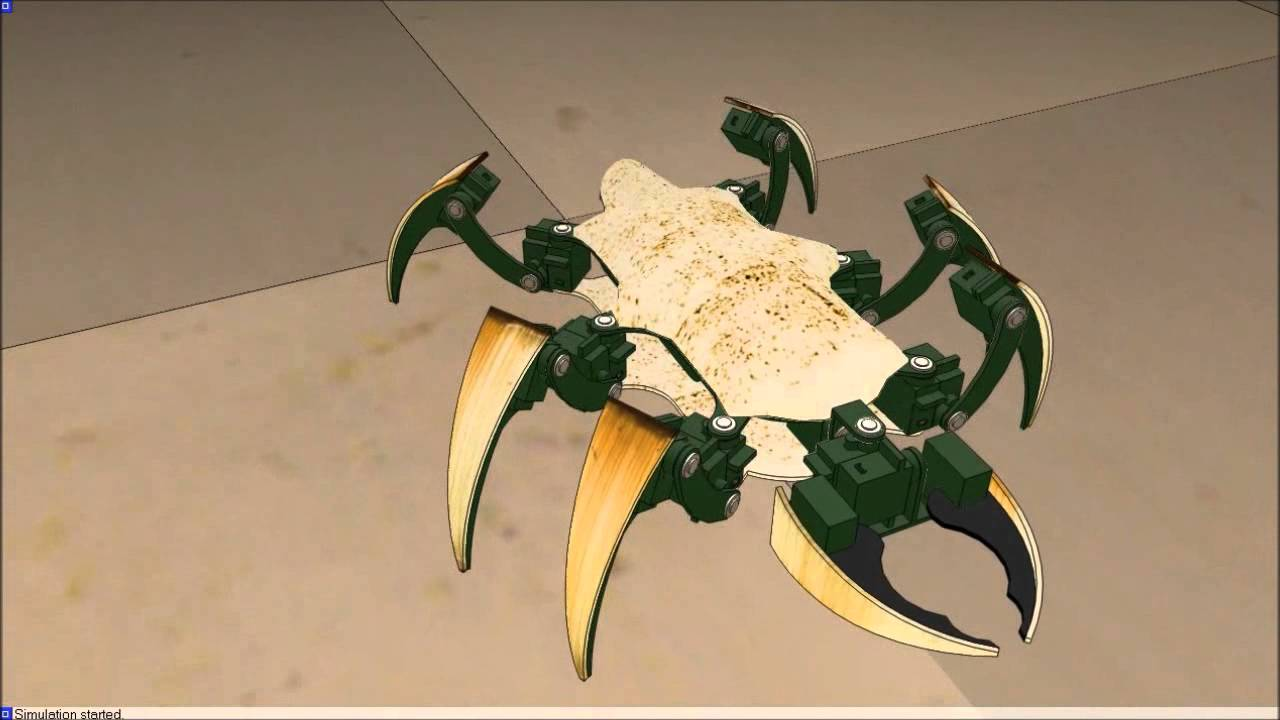
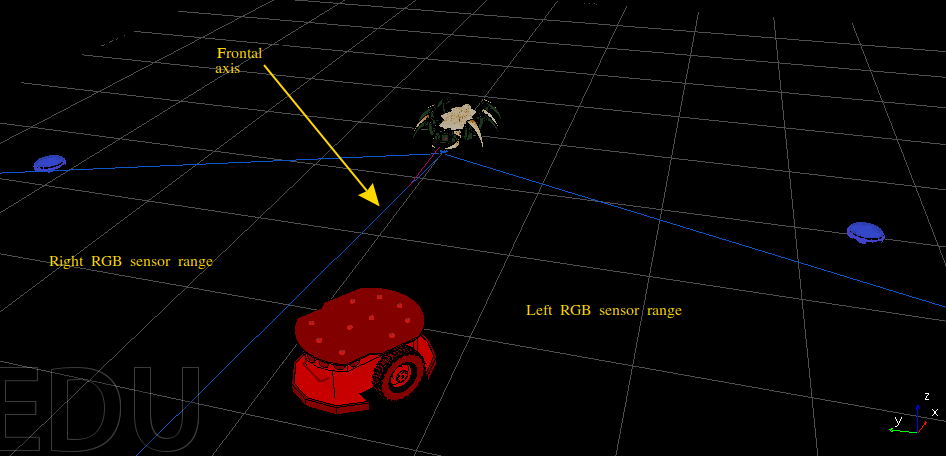
The master’s thesis evaluated the architecture in CoppeliaSim with ROS. This
tutorial evaluates the same perceptual and cognitive signal graph in the
packaged qrobot_simulator world.
Architecture
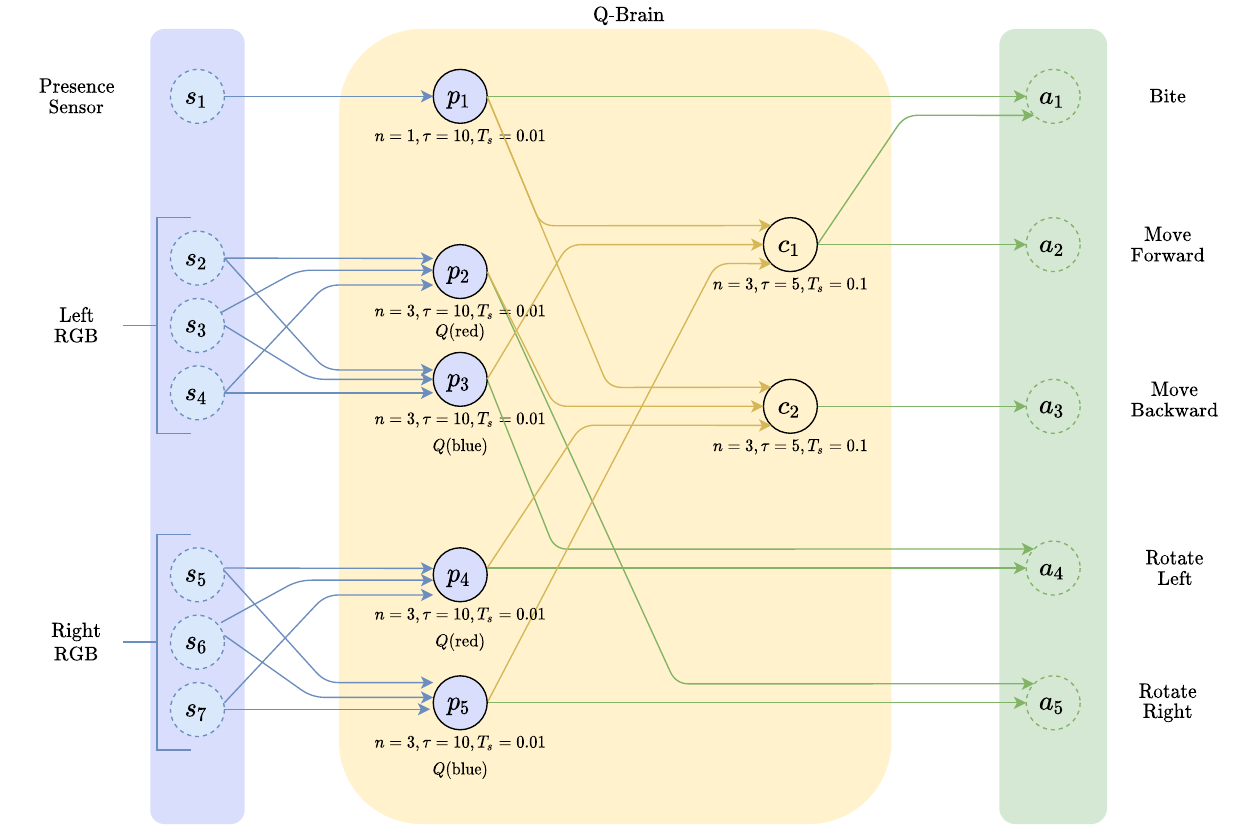
The network has four stages:
seven sensor interfaces publish proximity and left/right RGB readings;
five perceptual qUnits recognize proximity, red, or blue evidence;
two cognitive qUnits combine that evidence into prey and threat decisions;
five actuators turn those decisions into biting, translation, and rotation.
The two layers use different temporal windows. Perceptual units react to short sensor histories, while cognitive units integrate the resulting perceptual bursts over a longer history. Consequently, an actuator receives decisions about completed windows rather than forwarding the latest raw eye value.
Behavior |
Evidence used |
|---|---|
bite |
frontal proximity and prey cognition |
move forward |
prey cognition and eye-feature bursts |
move backward |
threat cognition |
rotate left |
left-blue and right-red perception |
rotate right |
left-red and right-blue perception |
Each ActuatorUnit averages its incoming bursts and publishes an activation
only when that normalized value is strictly greater than its threshold.
The thresholds reflect the discrete burst levels: forward combines prey
cognition with the eye-feature bursts to maintain a search drive when no target
is visible, backward requires a stronger threat decision, and the two-input
rotation actuators require strong lateral evidence. Backward also
has a larger physical gain than forward, so simultaneous opposing qBrain
activations still produce retreat rather than cancelling each other.
qBrain
The qBrain can be constructed independently of the physical world for inspection:
from pprint import pprint
from qrobot_qunits import RedisConfig
from qrobot_simulator.bug_world.robots.bug_robot import build_bug_qbrain

sensors, qunits, actuators = build_bug_qbrain(RedisConfig())
Seven sensorial units transport normalized world readings:
sensors
{'proximity': SensorialUnit "bug_proximity-615229"
      name:	bug_proximity
      id:	bug_proximity-615229
      sampling_period:	0.01,
 'lr': SensorialUnit "bug_lr-270b8d"
      name:	bug_lr
      id:	bug_lr-270b8d
      sampling_period:	0.01,
 'lg': SensorialUnit "bug_lg-9fc298"
      name:	bug_lg
      id:	bug_lg-9fc298
      sampling_period:	0.01,
 'lb': SensorialUnit "bug_lb-a8d1f7"
      name:	bug_lb
      id:	bug_lb-a8d1f7
      sampling_period:	0.01,
 'rr': SensorialUnit "bug_rr-0b4040"
      name:	bug_rr
      id:	bug_rr-0b4040
      sampling_period:	0.01,
 'rg': SensorialUnit "bug_rg-ae03ba"
      name:	bug_rg
      id:	bug_rg-ae03ba
      sampling_period:	0.01,
 'rb': SensorialUnit "bug_rb-d434c0"
      name:	bug_rb
      id:	bug_rb-d434c0
      sampling_period:	0.01}
Five perceptual units and two cognitive units process those readings:
qunits
{'presence': QUnit "bug_presence-1fe259"
      name:	bug_presence
      id:	bug_presence-1fe259
      model:	[model: AngularModel, n: 1, tau: 10]
      burst:	<class 'qrobot.bursts.zeroburst.ZeroBurst'>
      query:	[1.0]
      sampling_period:	0.01,
 'left_red': QUnit "bug_left_red-94a9de"
      name:	bug_left_red
      id:	bug_left_red-94a9de
      model:	[model: AngularModel, n: 3, tau: 10]
      burst:	<class 'qrobot.bursts.zeroburst.ZeroBurst'>
      query:	[1.0, 0.0, 0.0]
      sampling_period:	0.01,
 'left_blue': QUnit "bug_left_blue-129fb0"
      name:	bug_left_blue
      id:	bug_left_blue-129fb0
      model:	[model: AngularModel, n: 3, tau: 10]
      burst:	<class 'qrobot.bursts.zeroburst.ZeroBurst'>
      query:	[0.0, 0.0, 1.0]
      sampling_period:	0.01,
 'right_red': QUnit "bug_right_red-058cd1"
      name:	bug_right_red
      id:	bug_right_red-058cd1
      model:	[model: AngularModel, n: 3, tau: 10]
      burst:	<class 'qrobot.bursts.zeroburst.ZeroBurst'>
      query:	[1.0, 0.0, 0.0]
      sampling_period:	0.01,
 'right_blue': QUnit "bug_right_blue-d3f106"
      name:	bug_right_blue
      id:	bug_right_blue-d3f106
      model:	[model: AngularModel, n: 3, tau: 10]
      burst:	<class 'qrobot.bursts.zeroburst.ZeroBurst'>
      query:	[0.0, 0.0, 1.0]
      sampling_period:	0.01,
 'prey': QUnit "bug_prey-8cf315"
      name:	bug_prey
      id:	bug_prey-8cf315
      model:	[model: AngularModel, n: 3, tau: 5]
      burst:	<class 'qrobot.bursts.oneburst.OneBurst'>
      query:	[0.0, 0.0, 0.0]
      sampling_period:	0.1,
 'threat': QUnit "bug_threat-02e5e7"
      name:	bug_threat
      id:	bug_threat-02e5e7
      model:	[model: AngularModel, n: 3, tau: 5]
      burst:	<class 'qrobot.bursts.oneburst.OneBurst'>
      query:	[0.0, 0.0, 0.0]
      sampling_period:	0.1}
The 5 actuators expose the live input wiring and thresholds:
actuators
{'bite': ActuatorUnit "bug_bite-1673ef"
      name:	bug_bite
      id:	bug_bite-1673ef
      in_qunits:	{0: 'bug_presence-1fe259', 1: 'bug_prey-8cf315'}
      threshold:	0.75
      sampling_period:	0.1,
 'forward': ActuatorUnit "bug_forward-616fa7"
      name:	bug_forward
      id:	bug_forward-616fa7
      in_qunits:	{0: 'bug_prey-8cf315'}
      threshold:	0.25
      sampling_period:	0.1,
 'backward': ActuatorUnit "bug_backward-b19f1f"
      name:	bug_backward
      id:	bug_backward-b19f1f
      in_qunits:	{0: 'bug_threat-02e5e7'}
      threshold:	0.75
      sampling_period:	0.1,
 'rotate_left': ActuatorUnit "bug_rotate_left-c4f64b"
      name:	bug_rotate_left
      id:	bug_rotate_left-c4f64b
      in_qunits:	{0: 'bug_left_blue-129fb0', 1: 'bug_right_red-058cd1'}
      threshold:	0.75
      sampling_period:	0.1,
 'rotate_right': ActuatorUnit "bug_rotate_right-7516b2"
      name:	bug_rotate_right
      id:	bug_rotate_right-7516b2
      in_qunits:	{0: 'bug_left_red-94a9de', 1: 'bug_right_blue-d3f106'}
      threshold:	0.75
      sampling_period:	0.1}
actuator_configuration = {
    name: {
        "incoming_units": actuator.in_qunits,
        "threshold": actuator.threshold,
    }
    for name, actuator in actuators.items()
}
pprint(actuator_configuration, sort_dicts=False)
{'bite': {'incoming_units': {0: 'bug_presence-1fe259', 1: 'bug_prey-8cf315'},
          'threshold': 0.75},
 'forward': {'incoming_units': {0: 'bug_prey-8cf315'}, 'threshold': 0.25},
 'backward': {'incoming_units': {0: 'bug_threat-02e5e7'}, 'threshold': 0.75},
 'rotate_left': {'incoming_units': {0: 'bug_left_blue-129fb0',
                                    1: 'bug_right_red-058cd1'},
                 'threshold': 0.75},
 'rotate_right': {'incoming_units': {0: 'bug_left_red-94a9de',
                                     1: 'bug_right_blue-d3f106'},
                  'threshold': 0.75}}
Simulated world
BugWorld.demo() constructs the same arena and animals used by the public
example. A plain actuator-driven bug body is used here:
from qrobot_simulator.bug_world import BugWorld

world = BugWorld.demo()
pprint(world.board, sort_dicts=False)
Chessboard(columns=18, rows=12, cell_size=1.0)
pprint(world.bug, sort_dicts=False)
BugRobot(name='qBrain bug',
         x=5.5,
         y=4.0,
         heading=0.0,
         color='#704214',
         radius=0.3,
         max_speed=1.0,
         max_turn=0.7)
pprint(world.prey, sort_dicts=False)
[BluePrey(name='prey 1',
          x=9.5,
          y=6.2,
          heading=3.141592653589793,
          color='#2878d0',
          radius=0.3,
          max_speed=1.0,
          max_turn=2.0,
          motion_mode='deterministic'),
 BluePrey(name='prey 2',
          x=8.8,
          y=1.6,
          heading=2.6,
          color='#2878d0',
          radius=0.3,
          max_speed=1.0,
          max_turn=2.0,
          motion_mode='random')]
pprint(world.predator, sort_dicts=False)
RedPredator(name='predator',
            x=1.5,
            y=6.5,
            heading=-0.5,
            color='#d43c32',
            radius=0.3,
            max_speed=1.0,
            max_turn=2.0,
            motion_mode='deterministic',
            bite_period=3.0)
The world computes the exact seven normalized values consumed by the packaged sensor units:
pprint(world.readings, sort_dicts=False)
{'proximity': 0.0,
 'lr': 0.0,
 'lg': 0.0,
 'lb': 0.983198095219912,
 'rr': 0.0,
 'rg': 0.0,
 'rb': 1.0}
Each RGB eye points \(30^\circ\) away from the bug’s heading. Its response decreases with angular error and distance. Blue prey stimulate the blue eye channels, the red predator stimulates the red channels, and the frontal proximity sensor becomes active within its configured \(1.25\)-unit range and \(\pm25^\circ\) field of view. Bite contact is calculated separately from the two body radii and the configured bite reach. The simulation deliberately contains no green animal, so both green channels stay at zero.
One prey follows a repeatable curved path and the other wanders randomly; both
flee nearby hunters. The predator pursues the qBrain bug. BugWorld.step()
advances those animals, applies the bug’s actuator values, detects bites,
respawns captured prey, and refreshes the sensor readings.
Live demo
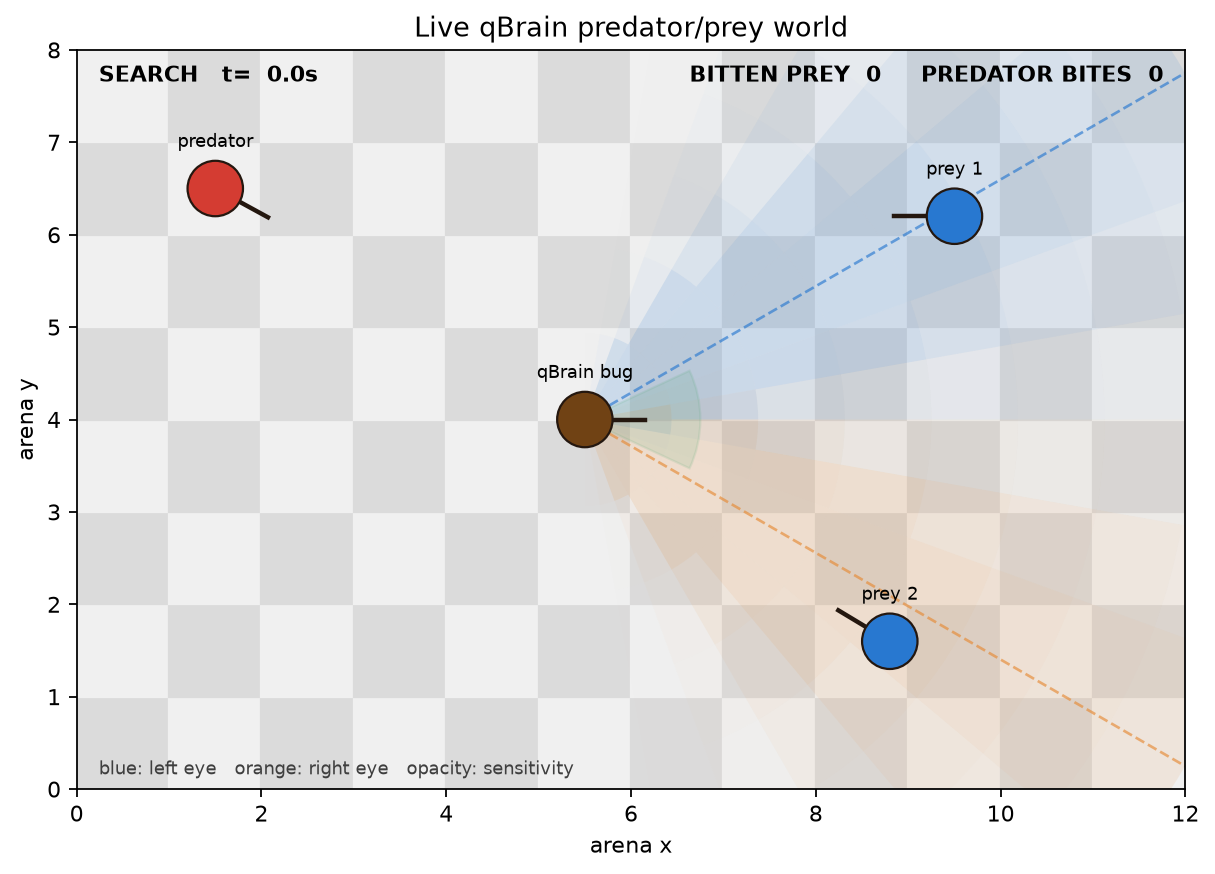
The live view shows the chessboard, four robots, frontal proximity region, both
RGB eye fields, current behavior, proximity region, and scores. BITTEN PREY
counts successful bug bites. PREDATOR BITES counts predator contacts, with a
cooldown so continuous contact is not scored once per frame.
World geometry produces sensor values; qUnits integrate those values and publish bursts; actuators select behavior; and that behavior changes the next world state. The renderer only displays this state and never infers behavior.
The red and blue perceptual units use ZeroBurst to query their target colors,
while the cognitive units use OneBurst. Every readout is a one-shot
measurement, so paths and firing patterns can vary even from similar geometry.
Run the example
Start Redis on localhost:6379, then run:
python examples/bug_world.py
The simulation runs until its window closes or Ctrl-C is pressed. The world
refresh rate can be changed independently of the qUnit worker periods:
python examples/bug_world.py --fps 5
For a bounded or headless run:
python examples/bug_world.py --duration 20
python examples/bug_world.py --duration 10 --no-show \
  --save-world bug_live_world.png
On shutdown it stops its workers and removes only the Redis keys owned by its BugRobot.
Reference
D. Lanza, Quantum-like Modeling of Cognitive Architectures for Robotics, Zenodo, 2020.