Getting started with qUnits
Research provenance
The Redis-connected qUnit/qBrain architecture is described in Quantum-like Modeling of Cognitive Architectures for Robotics. This tutorial demonstrates the current package runtime.
Important
This tutorial starts qUnit worker processes and therefore requires a Redis
server listening on localhost:6379. Install the qunits extra and start
Redis before executing this page. Redis is the shared communication and
observable-state sidecar for independently scheduled qUnit processes and the
dashboard.
from qrobot.bursts import OneBurst, ZeroBurst
from qrobot.logger import LoggingConfig, configure_logging
from qrobot.models import AngularModel
from qrobot_qunits import QUnit, SensorialUnit, redis_utils
from qrobot_visualization import build_network, draw
from IPython.display import HTML, display
from pathlib import Path
import time
# This is application-owned logging. The library does not configure handlers
# unless this opt-in helper is called.
logging_config = LoggingConfig(
    level=10,  # logging.DEBUG
    file_path=Path(".qrobot_logs/qrobot-qunits-debug.log"),
    console=False,  # keep executed-documentation output readable
)
configure_logging(logging_config)
<Logger qrobot (DEBUG)>
Set up a basic qBrain
First, define a sensorial input:
# Layer 0 - Unit 0
l0_unit0 = SensorialUnit("l0_unit0", sampling_period=0.1, logging_config=logging_config)
Then, choose a model and the desired bursts:
print(AngularModel(n=2, tau=10))
print(ZeroBurst())
print(OneBurst())
[model: AngularModel, n: 2, tau: 10]
<qrobot.bursts.zeroburst.ZeroBurst object at 0x7a3d983e12b0>
<qrobot.bursts.oneburst.OneBurst object at 0x7a3d983e12b0>
You can use objects like those to create a basic qBrain:
# Layer 1 - Unit 0
l1_unit0 = QUnit(
    name="l1_unit0",
    model=AngularModel(n=1, tau=10),
    burst=OneBurst(),
    sampling_period=0.1,
    in_qunits={0: l0_unit0.id},  # Will receive Input from l0_unit0, dim 0
    logging_config=logging_config,
)

# Layer 1 - Unit 1
l1_unit1 = QUnit(
    name="l1_unit1",
    model=AngularModel(n=1, tau=25),
    burst=ZeroBurst(),
    sampling_period=0.1,
    in_qunits={0: l0_unit0.id},  # Will receive input from l0_unit0, dim 0
    logging_config=logging_config,
)
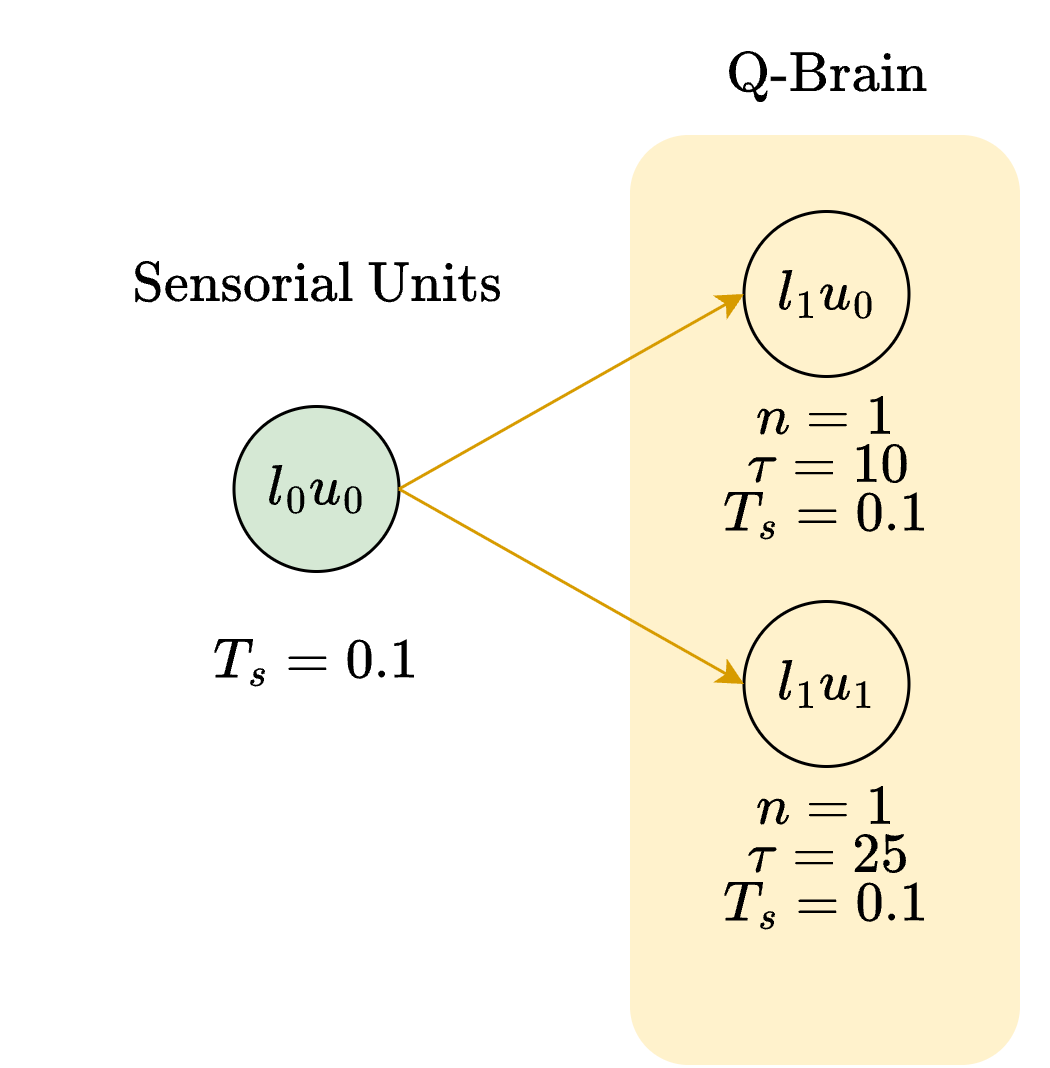
l0_unit0
SensorialUnit "l0_unit0-4f8ecf"
     name:	l0_unit0
     id:	l0_unit0-4f8ecf
     sampling_period:	0.1
l1_unit0
QUnit "l1_unit0-8a989b"
     name:	l1_unit0
     id:	l1_unit0-8a989b
     model:	[model: AngularModel, n: 1, tau: 10]
     burst:	<class 'qrobot.bursts.oneburst.OneBurst'>
     query:	[0.0]
     sampling_period:	0.1
l1_unit1
QUnit "l1_unit1-e63955"
     name:	l1_unit1
     id:	l1_unit1-e63955
     model:	[model: AngularModel, n: 1, tau: 25]
     burst:	<class 'qrobot.bursts.zeroburst.ZeroBurst'>
     query:	[0.0]
     sampling_period:	0.1
Check the default input for l0_unit0:
l0_unit0.scalar_reading
0.0
The input units for each qUnit are:
print(l1_unit0.in_qunits)
print(l1_unit1.in_qunits)
{0: 'l0_unit0-4f8ecf'}
{0: 'l0_unit0-4f8ecf'}
Modify l1_unit1 query:
l1_unit1.query = [0.8]
Real-time processing
Both qUnits sample every 0.1 seconds, but they integrate different numbers of
samples. l1_unit0 decides every \(10\times0.1=1\) second; l1_unit1 decides
every \(25\times0.1=2.5\) seconds.
The important direction of time is:
during a window, the qUnit reads and encodes incoming samples;
at the right edge, it applies its query to the accumulated state;
it performs one binary measurement and publishes the corresponding burst;
it resets the model and starts accumulating the next window, while the previous burst remains visible.
Therefore, an output drawn just after time \(t\) describes the completed window immediately before \(t\). It is not a decision about the current sensor sample.
The next cell runs the system in real time, records a snapshot every
refresh_time, and changes l0_unit0.scalar_reading once per second:
import time
import json
from random import randint
from IPython.display import clear_output

statuses = []
refresh_time = 0.25  # Plot four Redis snapshots per second.
input_change_period = 1.0
run_duration = 30
units = (l0_unit0, l1_unit0, l1_unit1)

for unit in units:
    unit.start()

try:
    for i in range(int(run_duration / refresh_time)):
        time.sleep(refresh_time)
        clear_output(wait=True)

        # Keep each random reading for one second, so both qUnits integrate
        # visible blocks of evidence rather than unrelated high-rate noise.
        if i % int(input_change_period / refresh_time) == 0:
            l0_unit0.scalar_reading = randint(0, 1000) / 1000

        status = redis_utils.redis_status()
        statuses.append(status)
        print(json.dumps(status, indent=1, sort_keys=True))
        print(round((i + 1) * refresh_time, 2), f"/{run_duration} seconds")

    latest_bursts = {
        l1_unit0.name: l1_unit0.get_burst_output(),
        l1_unit1.name: l1_unit1.get_burst_output(),
    }
finally:
    for unit in reversed(units):
        unit.stop()
{
 "l0_unit0-4f8ecf class": "SensorialUnit",
 "l0_unit0-4f8ecf output": "0.069",
 "l1_unit0-8a989b class": "QUnit",
 "l1_unit0-8a989b in_qunits": "{\"0\": \"l0_unit0-4f8ecf\"}",
 "l1_unit0-8a989b output": "0.0",
 "l1_unit0-8a989b query": "[0.0]",
 "l1_unit0-8a989b state": "0",
 "l1_unit1-e63955 class": "QUnit",
 "l1_unit1-e63955 in_qunits": "{\"0\": \"l0_unit0-4f8ecf\"}",
 "l1_unit1-e63955 output": "0.0",
 "l1_unit1-e63955 query": "[0.8]",
 "l1_unit1-e63955 state": "1"
}
30.0 /30 seconds
This graph shows the final recorded qBrain network state:
qbrain_graph = build_network(status_dict=statuses[-1])
qbrain_figure = draw(qbrain_graph)
display(HTML(qbrain_figure.to_html(full_html=False, include_plotlyjs=True)))
These are the latest outputs that were captured before stopping the units:
latest_bursts
{'l1_unit0': 0.0, 'l1_unit1': 0.0}
stop() already removes the keys owned by each unit:
redis_utils.redis_status()
{}
To flush the redis to clean all traces (should not be necessary if the qUnits processing loops stopped correctly):
redis_utils.flush_redis()
redis_utils.redis_status()
{}
Visualize the results
The recorded values show how signals evolve over that interval:
plot_unit_decisions([fast_plot, slow_plot])
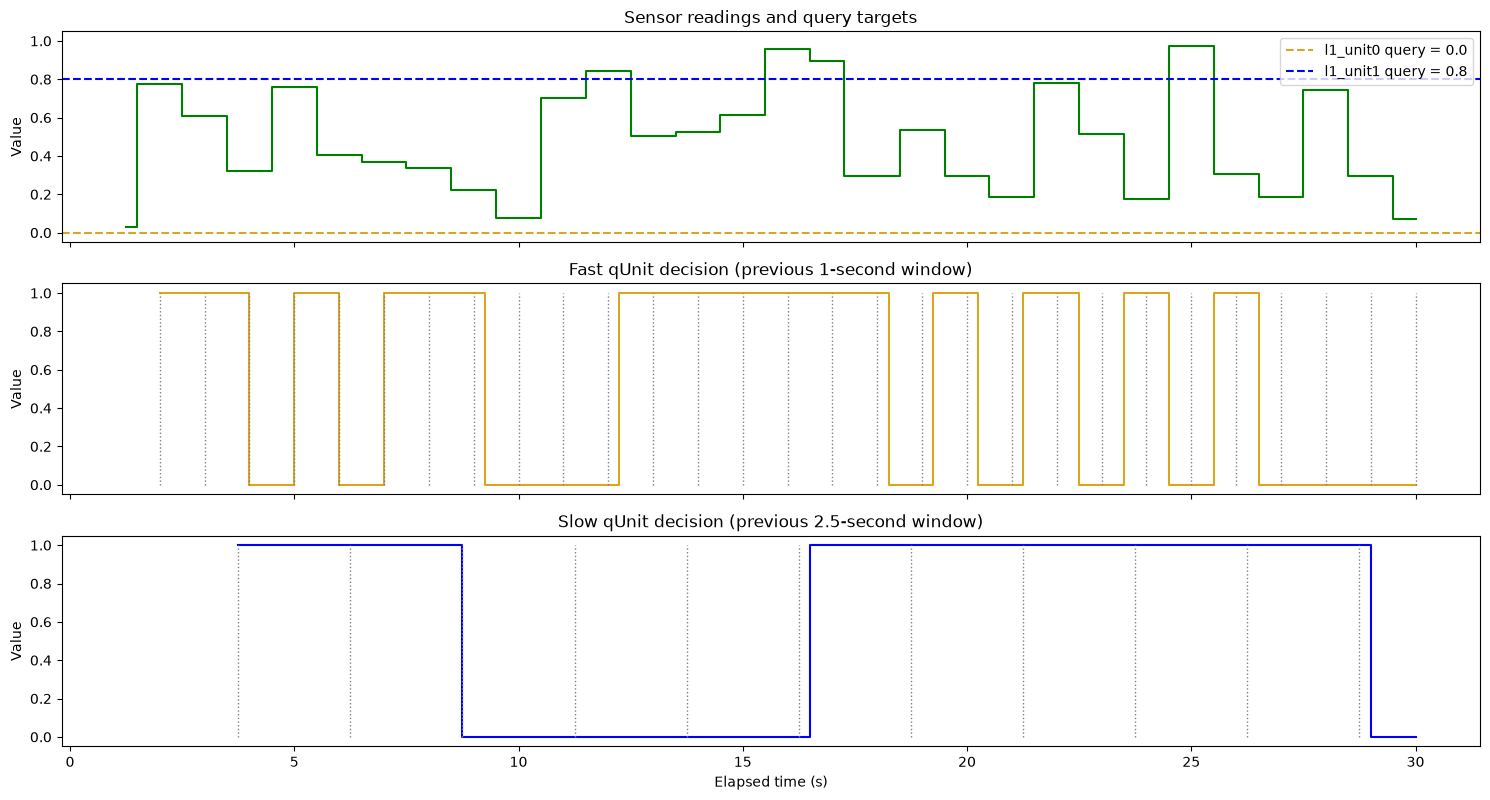
The top row contains only evidence and targets: the green trace is the sensor input, and the dashed lines are the two queries. The middle and bottom rows are the binary decision streams coming from each qUnit.
Each qUnit turns the previous temporal window of input values into one query-relative, probabilistic decision.
For the “fast” unit l1_unit0:
due to
OneBurstit publishes0when the measured is state \(\lvert 0 \rangle\)due to the query
0.0, the \(\lvert 0 \rangle\) state is more likely to be measured the closest the input is to0.0
For the “swow” unit l1_unitq:
due to
ZeroBurstit publishes1when the measured is state \(\lvert 0 \rangle\)due to the query
0.8, the \(\lvert 0 \rangle\) state is more likely to be measured the closest the input is to0.8
Focusing on l1_unit0:
print(l1_unit0)
plot_unit_decisions([fast_plot])
QUnit "l1_unit0-8a989b"
     name:	l1_unit0
     id:	l1_unit0-8a989b
     model:	[model: AngularModel, n: 1, tau: 10]
     burst:	<class 'qrobot.bursts.oneburst.OneBurst'>
     query:	[0.0]
     sampling_period:	0.1
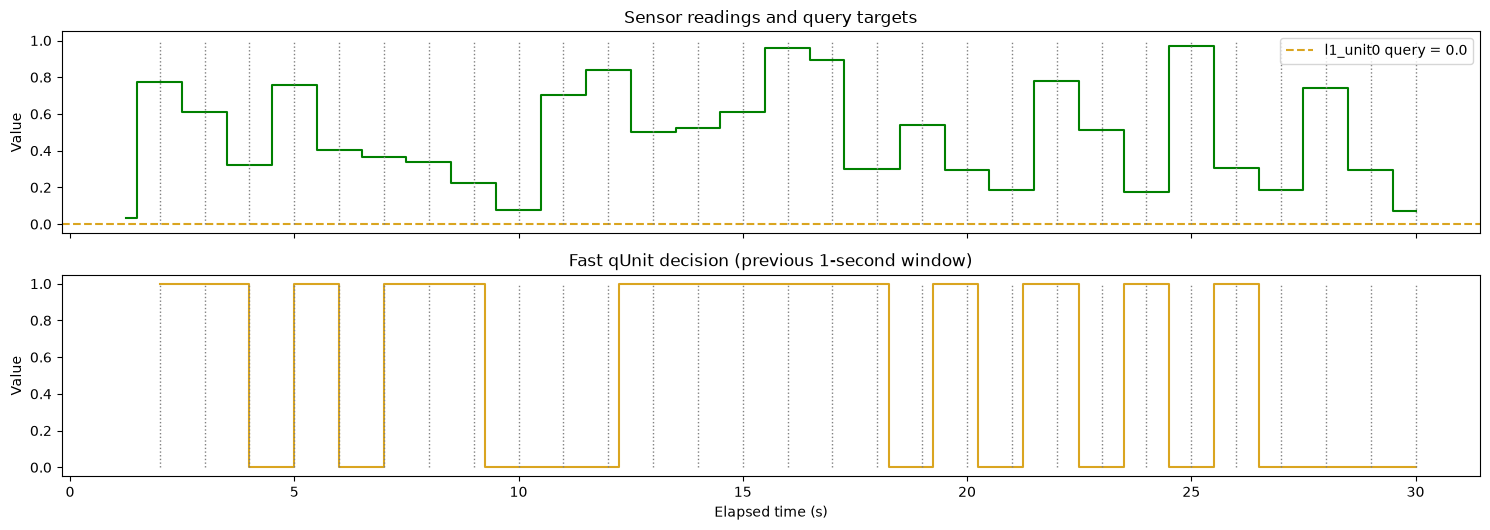
With query 0.0, l1_unit0 tends to emit 0 for windows near 0.0 and 1
for windows farther from 0.0. Each output comes from a finite quantum
measurement, so repeated runs can differ even when their inputs match.
Focusing on l1_unit1:
print(l1_unit1)
plot_unit_decisions([slow_plot])
QUnit "l1_unit1-e63955"
     name:	l1_unit1
     id:	l1_unit1-e63955
     model:	[model: AngularModel, n: 1, tau: 25]
     burst:	<class 'qrobot.bursts.zeroburst.ZeroBurst'>
     query:	[0.8]
     sampling_period:	0.1
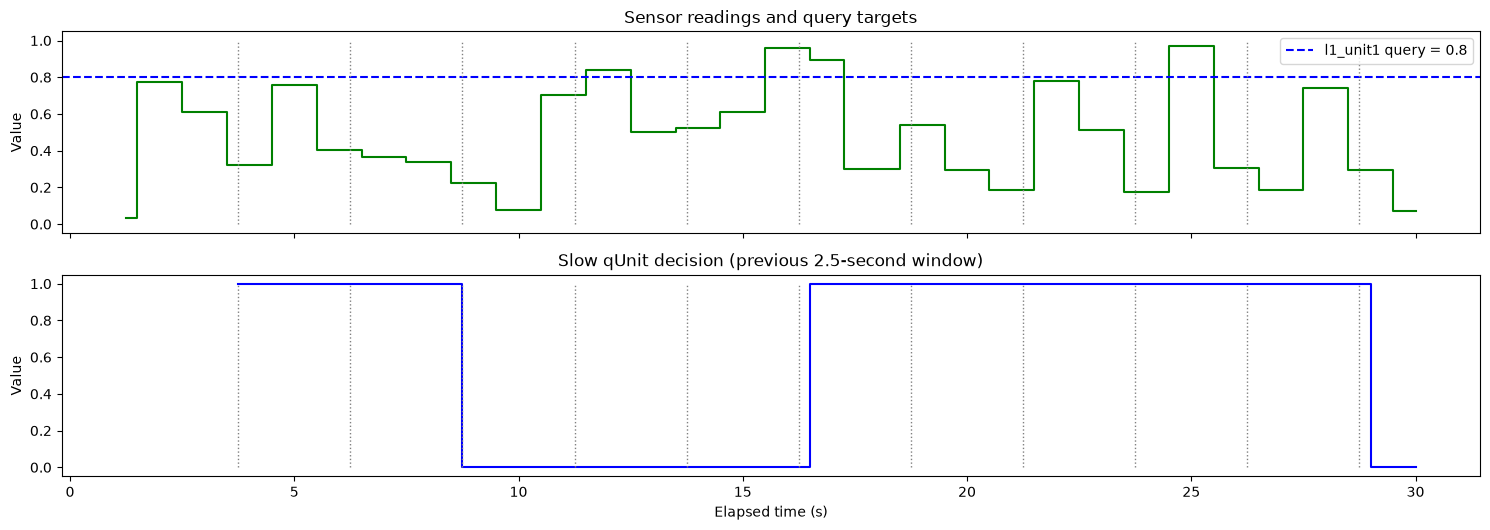
With query 0.8, the zero-bit ZeroBurst tends to emit 1 for windows near
0.8 and 0 for more distant windows. Finite measurement makes individual
outputs stochastic rather than a reproducible arithmetic summary such as a mean.
Logging and debugging qUnits
Logging is opt-in. Configure a rotating-free debug file and the console in the application that creates qUnits:
# The same config is passed to each unit above. This is important on platforms
# using `spawn`, where workers do not inherit the parent process's handlers.
logging_config
LoggingConfig(level=10, file_path=PosixPath('.qrobot_logs/qrobot-qunits-debug.log'), console=False)
The resulting log can be inspected without relying on a library-managed file:
print("\n".join(logging_config.file_path.read_text().splitlines()[-20:]))
2026-08-30 00:57:40,650 — qrobot.l0_unit0-4f8ecf — DEBUG — Writing input on redis
2026-08-30 00:57:40,684 — qrobot.l1_unit1-e63955 — DEBUG — Temporal window event 9/25
2026-08-30 00:57:40,686 — qrobot.l1_unit0-8a989b — DEBUG — Temporal window event 5/10
2026-08-30 00:57:40,687 — qrobot.l1_unit1-e63955 — DEBUG — input_vector=[0.069]
2026-08-30 00:57:40,689 — qrobot.l1_unit0-8a989b — DEBUG — input_vector=[0.069]
2026-08-30 00:57:40,753 — qrobot.l0_unit0-4f8ecf — DEBUG — scalar_reading=0.069
2026-08-30 00:57:40,753 — qrobot.l0_unit0-4f8ecf — DEBUG — Writing input on redis
2026-08-30 00:57:40,788 — qrobot.l1_unit1-e63955 — DEBUG — Temporal window event 10/25
2026-08-30 00:57:40,789 — qrobot.l1_unit0-8a989b — DEBUG — Temporal window event 6/10
2026-08-30 00:57:40,791 — qrobot.l1_unit1-e63955 — DEBUG — input_vector=[0.069]
2026-08-30 00:57:40,792 — qrobot.l1_unit0-8a989b — DEBUG — input_vector=[0.069]
2026-08-30 00:57:40,841 — qrobot.l1_unit1-e63955 — INFO — Stopping QUnit
2026-08-30 00:57:40,846 — qrobot.l1_unit1-e63955 — INFO — Cleaning redis
2026-08-30 00:57:40,851 — qrobot.l1_unit0-8a989b — INFO — Stopping QUnit
2026-08-30 00:57:40,856 — qrobot.l0_unit0-4f8ecf — DEBUG — scalar_reading=0.069
2026-08-30 00:57:40,856 — qrobot.l0_unit0-4f8ecf — DEBUG — Writing input on redis
2026-08-30 00:57:40,857 — qrobot.l1_unit0-8a989b — INFO — Cleaning redis
2026-08-30 00:57:40,862 — qrobot.l0_unit0-4f8ecf — INFO — Stopping SensorialUnit
2026-08-30 00:57:40,867 — qrobot.l0_unit0-4f8ecf — INFO — Cleaning redis
2026-08-30 00:57:41,182 — qrobot.redis — INFO — Flushing Redis database
print(
    "Time window time:",
    l1_unit1.sampling_period * l1_unit1.model.tau,
    "seconds",
)
matching_lines = [
    line
    for line in logging_config.file_path.read_text().splitlines()
    if "l1_unit1" in line and "Output state =" in line
]
print("\n".join(matching_lines[-10:]))
Time window time: 2.5 seconds
2026-08-30 00:57:16,363 — qrobot.l1_unit1-e63955 — DEBUG — Output state = 0
2026-08-30 00:57:18,958 — qrobot.l1_unit1-e63955 — DEBUG — Output state = 1
2026-08-30 00:57:21,550 — qrobot.l1_unit1-e63955 — DEBUG — Output state = 1
2026-08-30 00:57:24,152 — qrobot.l1_unit1-e63955 — DEBUG — Output state = 1
2026-08-30 00:57:26,746 — qrobot.l1_unit1-e63955 — DEBUG — Output state = 0
2026-08-30 00:57:29,343 — qrobot.l1_unit1-e63955 — DEBUG — Output state = 0
2026-08-30 00:57:31,940 — qrobot.l1_unit1-e63955 — DEBUG — Output state = 0
2026-08-30 00:57:34,545 — qrobot.l1_unit1-e63955 — DEBUG — Output state = 0
2026-08-30 00:57:37,152 — qrobot.l1_unit1-e63955 — DEBUG — Output state = 0
2026-08-30 00:57:39,748 — qrobot.l1_unit1-e63955 — DEBUG — Output state = 1